Drawing Open Circular Cycle Diagrams with a Python SVG Generator
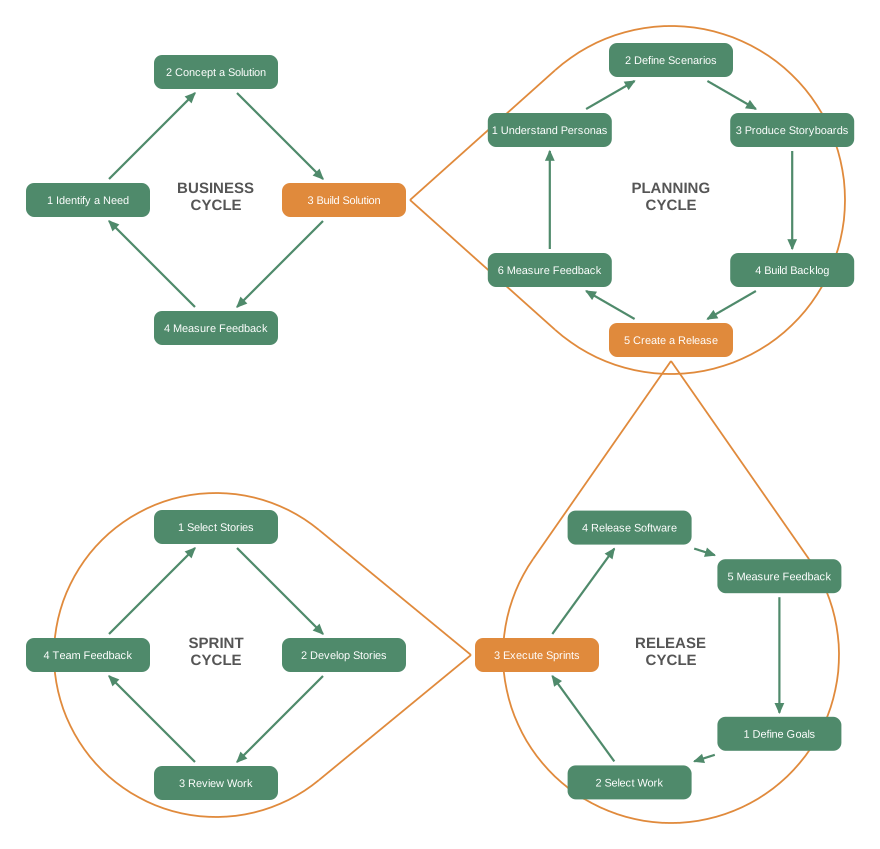
For The Agile Process I recreated the cohesive cycle figure from LaunchSchool’s Process Overview: four feedback loops drawn as rings, where each loop opens into the next.
What I compared
| Tool | Circular layout? | Why it did not work |
|---|---|---|
| Mermaid | No | Ranked straight lines, no radial layout; needs a runtime CDN script |
| PlantUML | No | Renders through Graphviz dot, same straight lines; needs Java and a render step |
Graphviz circo |
Partly | One ring is great; four chained rings cascade in a line, and closing the loop merges all nodes into one giant ring |
| Custom Python + SVG | Yes | Compute ring positions directly, full control |
The script that worked
Node positions on a ring are one cos/sin each. Each ring is rotated so its orange step faces the next cycle, lines are trimmed to box edges, and the “opens” funnel is two tangent lines onto the next ring. The ring is drawn as the major arc only, leaving a gap on the side the funnel enters, so it looks open.
assets/images/agile-cohesive-cycles.py:
import math, os

GREEN="#4f8a6b"; ORANGE="#e08a3c"; LABEL="#555"
NODE_W=124; NODE_H=34; GAP=4
RING_PAD=34

cycles = {
 "B": dict(name="BUSINESS\nCYCLE", c=(345,345), r=128, outline=False,
     steps=["1 Identify a Need","2 Concept a Solution","3 Build Solution","4 Measure Feedback"],
     orange=2, desired=0),
 "P": dict(name="PLANNING\nCYCLE", c=(800,345), r=140, outline=True,
     steps=["1 Understand Personas","2 Define Scenarios","3 Produce Storyboards","4 Build Backlog","5 Create a Release","6 Measure Feedback"],
     orange=4, desired=90),
 "R": dict(name="RELEASE\nCYCLE", c=(800,800), r=134, outline=True,
     steps=["1 Define Goals","2 Select Work","3 Execute Sprints","4 Release Software","5 Measure Feedback"],
     orange=2, desired=180),
 "S": dict(name="SPRINT\nCYCLE", c=(345,800), r=128, outline=True,
     steps=["1 Select Stories","2 Develop Stories","3 Review Work","4 Team Feedback"],
     orange=None, desired=270),
}

def positions(cy):
    c=cy["c"]; r=cy["r"]; k=len(cy["steps"]); step=360/k
    oi=cy["orange"] if cy["orange"] is not None else 0
    start=cy["desired"]-oi*step
    return [(c[0]+r*math.cos(math.radians(start+i*step)),
             c[1]+r*math.sin(math.radians(start+i*step))) for i in range(k)]

def box_edge(center, toward, hw=NODE_W/2+GAP, hh=NODE_H/2+GAP):
    dx,dy=toward[0]-center[0],toward[1]-center[1]
    if dx==0 and dy==0: return center
    t=min((hw/abs(dx)) if dx else 1e9,(hh/abs(dy)) if dy else 1e9)
    return (center[0]+dx*t, center[1]+dy*t)

def open_ring(C, Rc, apex, N=80):
    dx,dy=apex[0]-C[0],apex[1]-C[1]; d=math.hypot(dx,dy)
    beta=math.atan2(dy,dx); g=math.acos(max(-1,min(1,Rc/d)))
    a0=beta+g; a1=beta-g+2*math.pi
    pts=[(C[0]+Rc*math.cos(a0+(a1-a0)*i/N), C[1]+Rc*math.sin(a0+(a1-a0)*i/N)) for i in range(N+1)]
    d_attr="M%.1f,%.1f "%pts[0] + " ".join("L%.1f,%.1f"%p for p in pts[1:])
    return d_attr, pts[0], pts[-1]

allpts={k:positions(v) for k,v in cycles.items()}
Rc={k:(v["r"]+RING_PAD) for k,v in cycles.items()}
bridges=[("B","P"),("P","R"),("R","S")]

xs=[];ys=[]
for k,v in cycles.items():
    cx,cy=v["c"]
    if v["outline"]: xs+=[cx-Rc[k],cx+Rc[k]]; ys+=[cy-Rc[k],cy+Rc[k]]
    for (x,y) in allpts[k]:
        xs+=[x-NODE_W/2,x+NODE_W/2]; ys+=[y-NODE_H/2,y+NODE_H/2]
M=26; minx,maxx=min(xs)-M,max(xs)+M; miny,maxy=min(ys)-M,max(ys)+M

svg=[f'<svg xmlns="http://www.w3.org/2000/svg" viewBox="{minx:.0f} {miny:.0f} {maxx-minx:.0f} {maxy-miny:.0f}" font-family="Helvetica,Arial,sans-serif">']
svg.append(f'<defs><marker id="ah" markerUnits="userSpaceOnUse" markerWidth="11" markerHeight="11" refX="8" refY="4" orient="auto"><path d="M0,0 L9,4 L0,8 Z" fill="{GREEN}"/></marker></defs>')

for a,b in bridges:
    apex=box_edge(allpts[a][cycles[a]["orange"]], cycles[b]["c"])
    arc_d,T1,T2=open_ring(cycles[b]["c"], Rc[b], apex)
    svg.append(f'<path d="{arc_d}" fill="none" stroke="{ORANGE}" stroke-width="1.8"/>')
    svg.append(f'<line x1="{apex[0]:.1f}" y1="{apex[1]:.1f}" x2="{T1[0]:.1f}" y2="{T1[1]:.1f}" stroke="{ORANGE}" stroke-width="1.8"/>')
    svg.append(f'<line x1="{apex[0]:.1f}" y1="{apex[1]:.1f}" x2="{T2[0]:.1f}" y2="{T2[1]:.1f}" stroke="{ORANGE}" stroke-width="1.8"/>')

for k,cy in cycles.items():
    pts=allpts[k]; n=len(pts)
    for i in range(n):
        s=box_edge(pts[i],pts[(i+1)%n]); e=box_edge(pts[(i+1)%n],pts[i])
        svg.append(f'<line x1="{s[0]:.1f}" y1="{s[1]:.1f}" x2="{e[0]:.1f}" y2="{e[1]:.1f}" stroke="{GREEN}" stroke-width="2.2" marker-end="url(#ah)"/>')

for k,cy in cycles.items():
    lx,ly=cy["c"]
    for j,ln in enumerate(cy["name"].split("\n")):
        svg.append(f'<text x="{lx:.0f}" y="{ly+j*17-7:.0f}" fill="{LABEL}" font-size="15" font-weight="bold" text-anchor="middle">{ln}</text>')

for k,cy in cycles.items():
    for i,(x,y) in enumerate(allpts[k]):
        fill=ORANGE if cy["orange"]==i else GREEN
        svg.append(f'<rect x="{x-NODE_W/2:.1f}" y="{y-NODE_H/2:.1f}" width="{NODE_W}" height="{NODE_H}" rx="8" fill="{fill}"/>')
        svg.append(f'<text x="{x:.1f}" y="{y+4:.1f}" fill="white" font-size="11" text-anchor="middle">{cy["steps"][i]}</text>')

svg.append("</svg>")
out=os.path.join(os.path.dirname(__file__), "agile-cohesive-cycles.svg")
open(out,"w").write("\n".join(svg)); print("wrote", out)
Reproduce
Tools, all from Homebrew: python3, Graphviz (dot), and rsvg-convert from librsvg.
Generate the diagram (writes the SVG next to the script):
python3 assets/images/agile-cohesive-cycles.py
Preview as PNG:
rsvg-convert -w 950 -o /tmp/cycles.png assets/images/agile-cohesive-cycles.svg
The small “contains many” nesting diagram in the same post is plain Graphviz dot:
dot -Tsvg assets/images/agile-nested-loops.dot -o assets/images/agile-nested-loops.svg
Embed it as an image, no JavaScript or build plugin:
<img src="/assets/images/agile-cohesive-cycles.svg" alt="Four feedback cycles as open rings" style="max-width:100%;height:auto;">
References
- Process Overview, LaunchSchool’s Agile Planning book, source of the original diagram
- Mermaid, PlantUML, Graphviz (
circo) - SVG path arcs, librsvg
CLIs used:
python3, runs the SVG generatordot, Graphviz layout for the nesting diagramcirco, Graphviz circular layout used in early explorationrsvg-convert, renders SVG to PNG for preview- Homebrew, installs the above on macOS