The Agile Process
This post walks the whole Agile process: why it needs structure, the four nested loops it runs on, and a single example traced from a raw idea down to buildable stories.
Contents
- Why process?
- The process on one picture
- Four nested loops
- The planning cycle is a tree
- The six stages
- Example for a cleaning business
Why process?
It is tempting to jump straight to coding: we know what we want, and we’ll fix mistakes as we go. But the flexibility of software makes it look simpler than it is. It’s built from pure thought-stuff, so we stay optimistic, but our ideas are faulty, so we get bugs. Process is what tempers that optimism and keeps everyone building the same thing. Skip it and you get bugs and missed deadlines at best; system failures or business loss at worst. The common pitfalls it’s meant to mitigate:
- Building on assumptions
- Scope creep
- Missing requirements
- Missed requirements
- Changing requirements
- Wrong estimates
- No measure of progress
- It plain doesn’t work
Agile in essence is one thing: the continuous delivery of working, valuable software.
The process on one picture
Here is that whole process on a single diagram:
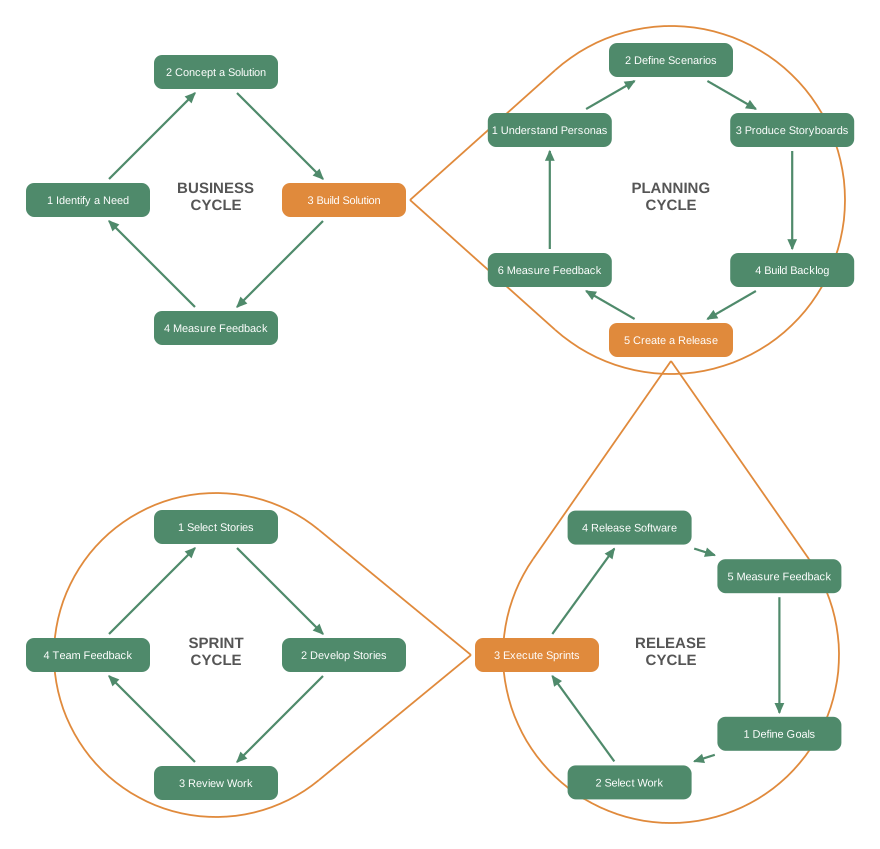
Diagram after the cohesive cycle figure in LaunchSchool’s Process Overview; recreated as an open-ring SVG (how).
Four feedback loops, each drawn as a ring: Business, Planning, Release, and Sprint. They nest, each ring a smaller and faster version of the one that contains it. One step in every ring is orange (build, create-a-release, execute-sprints), and that step is a doorway that opens into the next ring down, which is how the outer loops actually make progress. Every loop also ends by feeding back to its own step 1 and by measuring feedback, which is what makes the whole thing cohesive rather than a one-way waterfall.
The rest of this post follows that picture: the four rings from the outside in, then a zoom into the Planning ring, where a raw idea gets broken down all the way to buildable stories. We trace one example the whole way, a cleaning-business app.
Four nested loops
The loops differ mostly in timeline and in what they iterate on, but the shape is always the same: build a little, get feedback, adjust.
| Loop | Timeline | What it iterates on |
|---|---|---|
| Business | months to years | Company mission and direction |
| Planning | weeks to months | Feature sets for a solution |
| Release | a few sprints | A shippable slice of working software |
| Sprint | 1 to 2 weeks | The actual development work |
They stack, and the inner loops are how the outer ones actually make progress.
-
Business: the highest level, the corporate vision. The org forms a mission around a marketable product or service, ships value to the market, and lets market feedback set the next direction. A startup enters with an idea, builds prototypes to gain traction, and often finds its business model has to pivot to work. An established company makes a multi-year bet on a line of business, and a few years of performance decide whether it gets funded, killed, or reshaped.
-
Planning: for a given solution, there may be several planning cycles that produce feature sets and deliver them in releases. The people closest to the market, usually product managers and user experts, use data and experiments to find out what users want, which is rarely what users say they want. Out come personas and hypotheses about what would satisfy them. Once features ship, the team measures how users respond, validates the hypotheses, and lets that steer the next set of features.
-
Release: once you know the feature set that delivers user value, you plan a release to deliver a slice of working software. We almost never ship everything at once; that would mean a lot of up-front planning and a pile of unvalidated assumptions. Instead, portion off the most important features of the total solution and plan a release around that slice.
-
Sprint: where the bulk of the development gets done, usually over 1 to 2 weeks. The team plans the work for the sprint, coordinates to finish it in priority order, and ends by reviewing what went well and what to improve. Here the feedback is as much about the work process and the people as about the product.
The planning cycle is a tree
The goal of planning: take ideas through a series of steps until they’re broken down with enough detail to build the application.
At each step you usually produce multiple answers. One concept yields two personas. Each persona yields several scenarios. So the structure branches; it’s a tree.
That branching is the point. By the time you reach the leaves, you have a pile of small, concrete requirements you can execute against. To keep examples readable, follow one branch from trunk to leaf and watch each step feed the next.
Concept ★                     ◀ Application Concept
├─ Persona 1 ★                ◀ Developing Personas
│  ├─ Scenario 1
│  └─ Scenario 2 ★            ◀ Writing Scenarios
│     ├─ Storyboard 1
│     └─ Storyboard 2 ★       ◀ Storyboarding & Wireframes
│        ├─ Epic 1 ★          ◀ Writing Epics
│        │  ├─ Story 1 ★      ◀ Breaking Down Epics to Stories
│        │  └─ Story 2
│        └─ Epic 2
└─ Persona 2

★ = the single branch the examples follow, trunk to leaf.
Each level fans out (one concept, two personas; one persona, several scenarios), but the starred path is the one trunk we’ll trace all the way down to a story.
So, when a persona changes, a lot can change downstream.
The six stages
| Stage | Question it answers |
|---|---|
| Application concept | What problem, solved how? |
| Personas | Who uses it, and what do they need? |
| Scenarios | How does a user actually reach a goal? |
| Storyboards & wireframes | What do those interactions look like? |
| Epics | What are the smaller chunks of the story? |
| Stories | What’s the smallest slice of user value? |
Application concept
What’s the problem? How do you plan to solve it? What’s the mission and the goal, and roughly how might it look?
Personas
Who uses the concept? What does a typical user act like, and what do they need?
Scenarios
How does a user actually accomplish a goal? Write narrative: what they access, upload, share, and do when they use your software to solve their problem.
Storyboards and wireframes
Bring the scenarios to life. Storyboards illustrate interactions; wireframes show rough user interfaces.
Epics
Break the larger scenarios into shorter parts of the story. Each epic solves a smaller user goal and is informed by the storyboards and wireframes.
Stories
Each epic is still too big to build at once. Break it into the smallest components that deliver just a little user value. Together, the stories form the product backlog you build from, and the backlog is where this planning loop hands off to the release and sprint loops.
Example for a cleaning business
To make this concrete, let’s run the whole planning tree end to end on a single concept, software for a cleaning business, tracing one trunk from a raw idea down to buildable stories. Watch each stage hand its output to the next.
Ideas are easy
Our example idea for the rest of this walkthrough:
Concept: Cleaning-Business Platform
- Problem: A growing cleaning business drowns in admin: bookings, teams, scheduling, and payments scattered across tools.
- Solution: One platform to manage all of it, so the owner spends less time on admin and more time growing.
High level on purpose. We don’t yet know the screens, the features, or even who exactly feels the pain. That’s what the next stages pull out, starting with the personas.
Who are your users?
This is the first question to ask once you have a concept, because pinning down who actually uses it lets you:
- Check whether they really exist.
- Research what would actually help them.
- Refer back to them at every later step.
Big organizations run extensive user research. For our purposes, we can conceptualize typical users and run cheap tests to validate. The output is a set of short biographies of the people you believe would use the software; they have names, they have problems, and they inform the design. That bio is the persona.
A cleaning platform has four kinds of users: owner, office admin, cleaner, and customer. Each is a persona worth writing. We’ll follow the one whose pain started the whole idea: the owner.
Building the persona
Walk the steps, building the owner as a specific, real person rather than a generic “business owner.”
Title
A short label that gets to the root of the user, so you can tell personas apart at a glance: The Growing Cleaning-Business Owner.
Name and picture
Make the persona a real, specific person, not a group. We don’t care about owners in the abstract; we care about this one and her wants, needs, and limits. Her name: Sofia Marenco.
Demographic sketch
A few details to evoke her in everyone’s mind:
- 41 years old
- Female, married
- Owns “BrightNest”, a 10-person crew
- Started as a cleaner, learned the business by running it
Goals and tasks
The meat. Describe her real motivations honestly, not bent toward your solution. What matters to her? What does she need to get done? Sofia is great at cleaning and at winning customers, but the admin behind a growing crew is swallowing her evenings. Jobs, people, and money live across a paper calendar, WhatsApp, and a spreadsheet.
Her goals:
- Keep cleaners busy without double-booking
- Get paid on time, stop chasing invoices
- Grow the crew without drowning in admin
Her tasks:
- Assigns the week’s jobs every Sunday night
- Juggles a paper calendar, WhatsApp, and a spreadsheet
- Fields customer calls to book and reschedule
- Reconciles who-did-what before invoicing
Technical environment
Because we’re designing software, her tech skill and devices drive the design. You’d build a tool one way for a veteran programmer and another for someone who runs a business off a phone.
Sofia is comfortable with a phone and spreadsheets but isn’t technical and has no IT help. She runs BrightNest from a laptop at the kitchen table in the evening and from her phone between jobs during the day. A heavy, desktop-only tool that assumes a quiet office is useless to her.
A line that sums her up
Capture her situation in one sentence: she started a cleaning company, not a scheduling company, yet she spends more time on the calendar than anyone.
The persona sheet
Assemble the parts into a one-page sheet, the output of this exercise.
┌─────────────────────────────────────────────────┐
│ PERSONA: The Growing Cleaning-Business Owner    │
├─────────────────────────────────────────────────┤
│ Name       Sofia Marenco                        │
│ Profile    41 · female · married                │
│ Work       Owns "BrightNest", a 10-person crew  │
│ Education  Started as a cleaner, learned the    │
│            business by running it               │
├─────────────────────────────────────────────────┤
│ Goals                                           │
│   • Keep cleaners busy without double-booking   │
│   • Get paid on time, stop chasing invoices     │
│   • Grow the crew without drowning in admin     │
├─────────────────────────────────────────────────┤
│ Tasks                                           │
│   • Assigns the week's jobs every Sunday night  │
│   • Juggles a paper calendar, WhatsApp, a sheet │
│   • Fields customer calls to book and reschedule│
│   • Reconciles who-did-what before invoicing    │
├─────────────────────────────────────────────────┤
│ Tech                                            │
│   • Comfortable with a phone and spreadsheets   │
│   • Not technical; no IT help                   │
│   • Runs the business from a laptop at the      │
│     kitchen table and her phone in the car      │
└─────────────────────────────────────────────────┘
This isn’t a waste of time
It feels strange to open a complex software project with a session of make-believe. But it’s because of the complexity that a little play up front pays off; it surfaces your users and kills assumptions.
People own their ideas. They cherish them and flinch at anything suggesting an idea is weak, so they assume instead of researching. That’s worst when the idea comes from highly technical people, who tend to be a little out of touch with how everyone else uses software.
We might assume a slick command-line tool is brilliant, because we’d love it. But look at Sofia: say “command line” to her and she’ll stare at you. We might also reach for the latest framework with heavy animations and effects, until we remember she’s tapping at her phone between jobs, one-handed, on patchy signal. The persona forces the app to be a fast, forgiving, phone-friendly tool instead.
A persona is a cheap shared document the whole team can hold an idea up against: How would Sofia react to this? Would she know, instantly, how to do it? Remember, you’re building to solve her problem, not yours.
And her single loudest pain, the Sunday-night juggling act, points straight at which scenario to follow next.
The scenario
A persona produces several scenarios: booking a new customer, chasing a failed payment, onboarding a cleaner. We follow the one tied to her loudest pain:
Scenario: Sunday Scheduling
- Actor: Sofia, the owner
- Trigger: Next week’s jobs have come in
- Flow: Drag each job onto a cleaner who is free, near the address, and not already booked at that hour.
- Guard: A double-booking is caught before the cleaner ever finds out.
- Success: Every cleaner knows their week
That narrative is doing real work: it names the actors (owner, cleaners), the trigger (weekly jobs), and the success condition (no conflicts, everyone notified). The next stages just sharpen it.
Storyboard and wireframe
Bringing the scenario to life, rough screens, no styling, just the flow:
[1] Week view
┌─────────────────────────────┐
│ Mon  Tue  Wed  Thu ...      │
│ ┌────┐                      │
│ │ J1 │  unassigned          │
│ └────┘                      │
│ ┌────┐ ┌────┐               │
│ │ J2 │ │ J3 │               │
│ └────┘ └────┘               │
└─────────────────────────────┘
               ▼
[2] Drag to assign
┌─────────────────────────────┐
│ Tue 10:00                   │
│ ┌──────────────┐            │
│ │ J1 -> Mara   │            │
│ └──────────────┘            │
│ Mara notified               │
└─────────────────────────────┘
               ▼
[3] Conflict caught
┌─────────────────────────────┐
│ Conflict!                   │
│ Mara already has a job      │
│ at 10:00.                   │
│ [Reassign] [Pick another]   │
└─────────────────────────────┘
Three rough frames are enough to agree on the interaction before anyone writes code. Sofia can look at this and tell you in five seconds whether it matches her Sunday ritual.
The epic
The storyboard points at one chunk of the larger story. Sofia’s whole world has several epics (Online Booking, Payments, Team Management, Reporting), but the scenario we followed lands here:
Epic: Smart Scheduling
- Role: owner
- Goal: place, move, and reassign jobs on a weekly calendar
- Value: the system prevents impossible schedules
Still too big to build in one go. So we break it into stories.
The stories
The leaves of the tree. Each is a thin vertical slice of value, small enough to build and verify on its own. Written so a test can confirm each one is done:
Story: Assign a job to a cleaner
- Given the admin is viewing the weekly calendar
- When they drag a job to a slot for a cleaner
- Then the job is assigned to that cleaner
- And the cleaner receives a notification
Story: Reschedule a job
- Given a job is scheduled for Tuesday at 10:00
- When the admin drags it to Wednesday at 14:00
- Then the job time is updated
- And the customer and cleaner are notified
Story: Warn on a scheduling conflict
- Given a cleaner already has a job at 10:00
- When another job at 10:00 is added for them
- Then the system shows a conflict warning
- And the admin can reassign or change the time
Those three stories are the product backlog for Sofia’s first slice. They’re concrete enough to estimate, build, and check off, and because each one ends in a verifiable condition, done isn’t a matter of opinion.
The whole trunk, on one tree
Cleaning-platform concept ★            ◀ Application Concept
├─ Owner (Sofia) ★                     ◀ Personas
│  ├─ Sunday scheduling ★              ◀ Scenarios
│  │  └─ Weekly calendar screens ★     ◀ Storyboards & Wireframes
│  │     └─ Smart Scheduling ★         ◀ Epics
│  │        ├─ Assign by drag ★        ◀ Stories
│  │        ├─ Reschedule a job ★
│  │        └─ Warn on conflict ★
│  ├─ Failed-payment scenario
│  └─ Onboard-a-cleaner scenario
├─ Office Admin
├─ Cleaner
└─ Customer

★ = the trunk we traced, concept to story.
The planning output: a design doc
Everything above rolls up into one artifact the team builds from. Here it is shaped as a design doc, trimmed to the planning-relevant chapters. Each planning stage lands in a chapter, the application concept included:
| Planning stage | Design-doc chapter |
|---|---|
| Application concept | Objective, Background |
| Personas | User roles |
| Scenarios | Scenarios |
| Epics, Stories | Implementation timeline |
| Out-of-scope calls | Non-goals |
Objective
A management platform for a cleaning-service business: bookings, scheduling, teams, customers, and payments in one place.
Background
Sofia runs BrightNest, a 10-person crew. Jobs, people, and money live across a paper calendar, WhatsApp, and a spreadsheet, and the admin is swallowing her evenings. The loudest pain is assigning the week without double-booking.
Goals
- Keep cleaners busy without double-booking.
- Get paid on time, stop chasing invoices.
- Grow the crew without adding admin.
- Usable from a phone between jobs.
Non-goals (v1)
- AI assistant or conversational interface.
- Multi-language support.
- White-label or reseller features.
- Inventory and supply management.
User roles
- Owner: runs the company, sees reports, handles billing.
- Office admin: schedules jobs, talks to customers, day-to-day ops.
- Cleaner: sees assignments, marks work complete from a phone.
- Customer: books cleanings, manages properties, pays invoices.
Scenarios
- Sofia assigns next week without double-booking (the trunk we traced).
- A customer books a recurring cleaning online.
- A cleaner marks a job complete and the card on file is charged.
Service level objectives
- The weekly calendar loads in under two seconds on a phone.
- Scheduling stays available during business hours, with no data loss on a conflict.
Architecture
A thin web app for owner and admin, mobile-friendly for cleaners. Open questions carried from discovery: payment processor (Stripe or Square), SMS provider, and which rental calendars to sync.
Security
Role-based access so each role sees only what it needs. Card details stay with the payment processor, never in our database.
Implementation timeline
- Milestone 1: smart scheduling (the first release).
- Milestone 2: invoicing and payments.
- Milestone 3: online booking and quoting.
- Milestone 4: messaging and notifications.
- Milestone 5: reporting and integrations (Airbnb, etc).